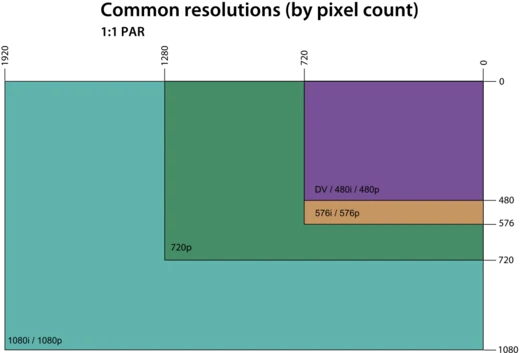
Display resolution standards
Standardized pixel dimensions for electronic visual displays.

Quilbert , edited by: Cmuelle8 · CC BY-SA 3.0
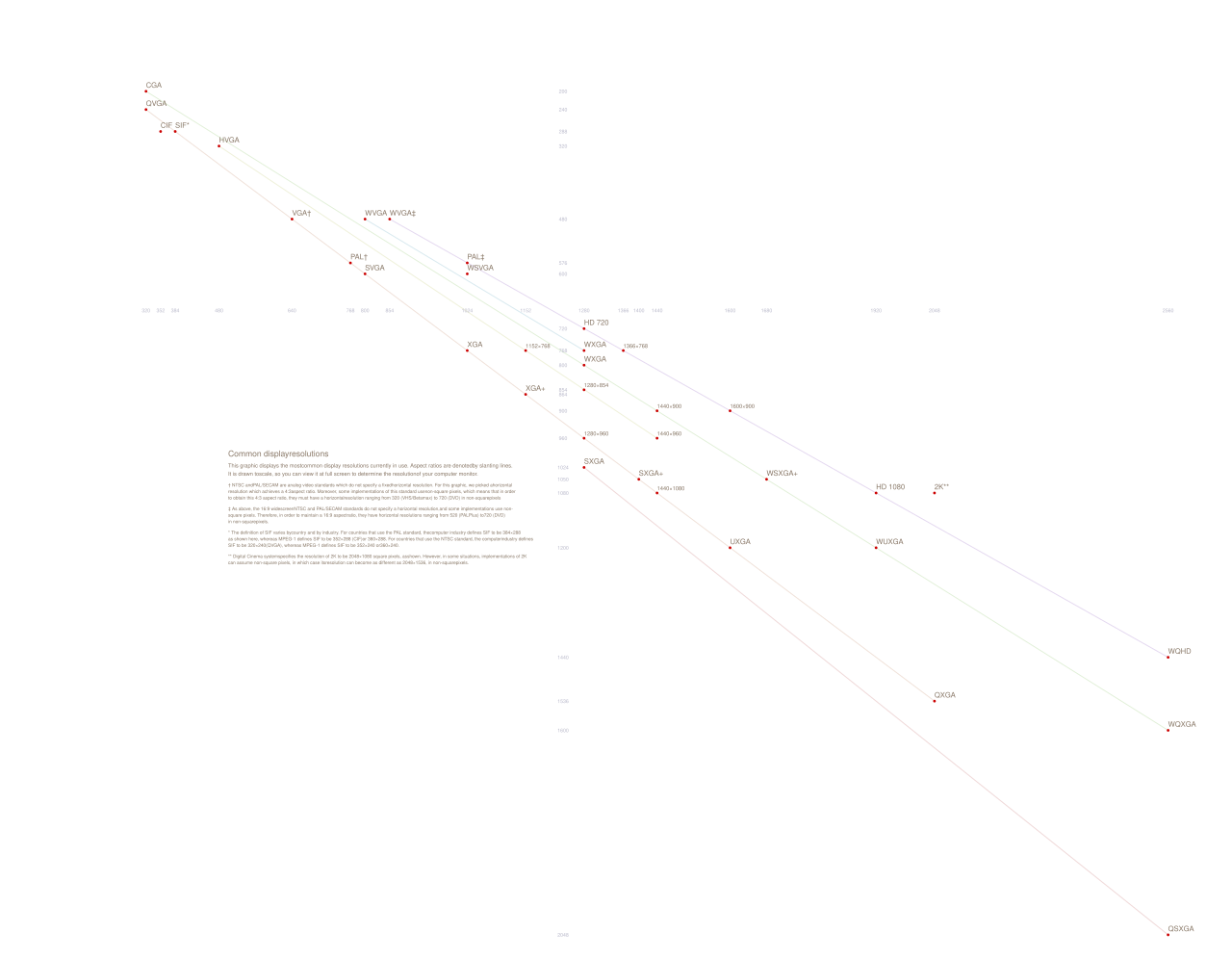
A display resolution standard defines a common width and height, measured in pixels, for electronic visual displays like computer monitors. Certain width-height combinations are standardized by groups such as VESA and are given a name or acronym that describes their dimensions. The terms "display mode" or "video mode" are sometimes used instead, but these usually also include details like refresh rate and color depth.
Resolution itself refers only to the number of distinct pixels a screen can show, which affects image sharpness and clarity. It can be influenced by the display type, signal format, aspect ratio, and refresh rate. Some resolutions are referred to by a single number, such as "1080p" or "4K," which indicates the horizontal or vertical pixel count. More generally, resolutions are written as two numbers separated by a multiplication sign (e.g., "1920×1080"), representing width and height in pixels. Because most screens are landscape-oriented to match the human field of view, the width number is larger than the height number, even for handheld devices used primarily in portrait orientation.
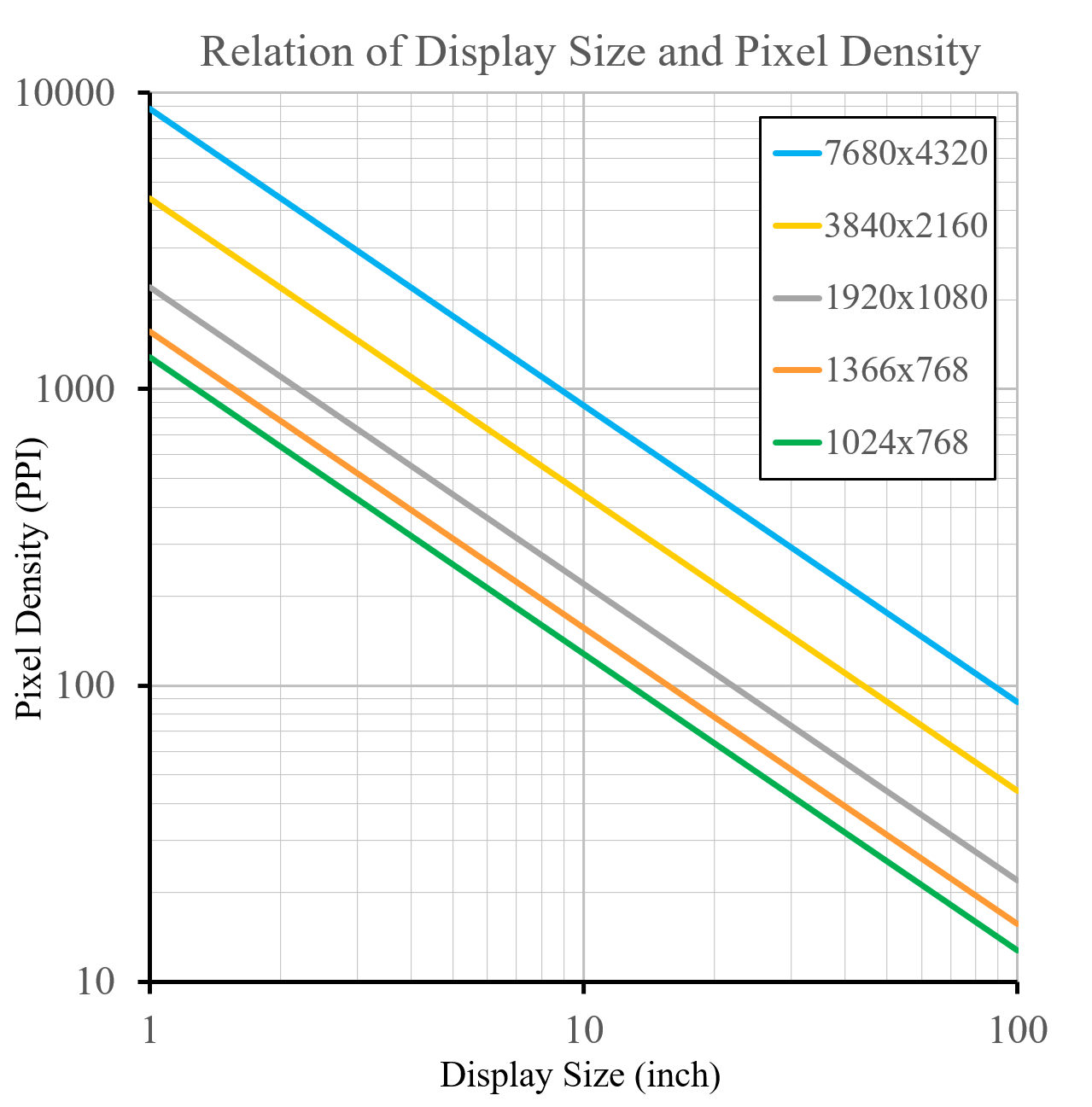
Aspect ratio—the ratio of width to height—affects how an image is scaled, stretched, or cropped to fit the screen. Common aspect ratios include 4:3, 16:10 (equal to 8:5), 16:9, and 21:9. Aspect ratio also influences the perceived size of objects on screen. Pixel density can be calculated from the native resolution and the physical dimensions of the display; higher pixel density generally means smaller individual pixels.
Many displays support multiple resolutions and aspect ratios, which users or software can change. Some devices use a hardware or native resolution that is a simple multiple of the recommended software or virtual resolution to show finer details, marketed with terms like "Retina display."
The favored aspect ratio of mass-market displays has shifted over time: from 4:3 to 16:10, then to 16:9, and more recently to 18:9 for smartphones. The 4:3 ratio is typical of older products, especially cathode ray tube (CRT) displays. The 16:10 ratio was most common between 1995 and 2010, while 16:9 became standard for post-2010 computer monitors, laptops, and entertainment displays. On CRTs, the computer resolution's aspect ratio often differed from the display's, resulting in non-square pixels (e.g., 320×200 or 1280×1024 on a 4:3 display).
- Common aspect ratios
- 4:3, 16:10 (equal to 8:5), 16:9, and 21:9
- Favored aspect ratio transition
- from 4:3 to 16:10 to 16:9 to 18:9 for smartphones
- Full hd resolution
- 1920×1080 (FHD)
- 4k uhd resolution
- 3840×2160 (4K UHD)
- Qhd resolution
- 960×540 (quarter HD)
- Hd resolution
- 1280×720 (HD)
- Hd+ resolution
- 1600×900 (HD+)
Lore & Background
The favored aspect ratio of mass-market display industry products has changed gradually from 4:3, then to 16:10, then to 16:9, and has now changed to 18:9 for smartphones. The 4:3 aspect ratio generally reflects older products, especially the era of the cathode ray tube (CRT). The 16:10 aspect ratio had its largest use in the 1995–2010 period, and the 16:9 aspect ratio tends to reflect post-2010 mass-market computer monitor, laptop, and entertainment products displays. On CRTs, there was often a difference between the aspect ratio of the computer resolution and the aspect ratio of the display causing non-square pixels (e.g. 320×200 or 1280×1024 on a 4:3 display).
When good quality alternate technologies (i.e., liquid crystal displays and plasma displays) became more available and less costly around the year 2000, common computer displays and entertainment products moved to a wider aspect ratio, first to 16:10. Around 2005, home entertainment displays gradually moved from 16:10 to 16:9. By about 2007, virtually all mass-market entertainment displays were 16:9. In 2011, 1920×1080 (Full HD) was the favored resolution in the most heavily marketed entertainment market displays. The next standard, 3840×2160 (4K UHD), was first sold in 2013. Also in 2013, displays with 2560×1080 (commonly referred to as '21:9') appeared, and in 2014, '21:9' screens with pixel dimensions of 3440×1440 became available.
The computer display industry maintained the 16:10 aspect ratio longer than the entertainment industry, but in the 2005–2010 period, computers were increasingly marketed as dual-use products. By 2011, the 16:10 aspect ratio had virtually disappeared from the Windows laptop display market (though Mac laptops are still mostly 16:10). In response to usability flaws of 16:9 displays in office/professional applications, Microsoft and Huawei started to offer notebooks with a 3:2 aspect ratio; by 2021, Huawei also offers a monitor display with this aspect ratio.
Reader's Guide
The significance of display resolution standards lies in their role as a common reference for width and height dimensions of electronic visual displays, measured in pixels. These standards, often set by organizations like VESA, provide a consistent naming and initialism system that describes dimensions. The resolution itself indicates the number of distinct pixels that can be displayed, affecting image sharpness and clarity. The aspect ratio, which is the ratio of width to height, determines how images are scaled and stretched or cropped to fit the screen. The most common aspect ratios have shifted over time from 4:3 to 16:10 to 16:9, and now to 18:9 for smartphones, reflecting changes in technology and market preferences. The native screen resolution together with physical dimensions can be used to calculate pixel density, and an increase in pixel density often correlates with a decrease in the size of individual pixels. Some displays support multiple resolutions and aspect ratios, which can be changed by the user or software, and some devices use a hardware/native resolution that is a simple multiple of recommended software/virtual resolutions to show finer details, marketed as 'Retina display'. The legacy of these standards is evident in the widespread adoption of specific resolutions like 1920×1080 (Full HD) and 3840×2160 (4K UHD), which have become benchmarks for entertainment and computing.
The Long March of Aspect Ratios
The favored aspect ratio in mass-market displays has undergone a gradual transformation over several decades. The 4:3 ratio dominated the era of cathode ray tube displays, which were inherently difficult to adapt to wider formats. As liquid crystal and plasma technologies became more affordable around 2000, the industry shifted to 16:10, a compromise that accommodated older broadcast content while improving widescreen movie viewing. By 2005, home entertainment displays began migrating to 16:9 for a superior cinematic experience, and by 2007, virtually all mass-market entertainment screens had adopted this ratio. The computer display industry held onto 16:10 longer, but during the 2005–2010 period, as laptops became dual-use entertainment devices, nearly all Windows manufacturers followed suit, with Apple remaining a notable exception. In 2011, 16:10 had largely vanished from the Windows laptop market. More recently, smartphones have embraced 18:9, and in response to usability concerns in professional settings, Microsoft and Huawei have introduced 3:2 aspect ratio notebooks and monitors.
Naming, Standards, and the Language of Pixels
A display resolution standard refers to a commonly used width-and-height pixel dimension for electronic visual displays, typically applied to devices such as computer monitors. Certain combinations are formalized by organizations like VESA and assigned descriptive names and initialisms. The resolution itself simply quantifies the distinct pixels a screen can show, influencing sharpness and clarity, and is shaped by factors including display type, signal format, aspect ratio, and refresh rate. The broader terms "display mode" or "video mode" encompass additional specifications such as refresh rate and color depth. Resolutions can be expressed as two numbers separated by a multiplication sign, such as 1920×1080, where the first figure denotes horizontal columns and the second vertical lines. Because most screens favor a landscape orientation to match the human field of view, the width number conventionally exceeds the height, a convention that persists even for handheld devices predominantly used in portrait mode. Some resolutions are referenced by a single number, like "1080p" or "4K," representing either the horizontal or vertical pixel count.
From Full HD to Ultra-Wide Cinema
All standard high-definition resolutions share a 16:9 aspect ratio, though derived formats with narrower or wider ratios also exist. YouTube, for example, recommends uploads in 16:9 with vertical line counts of 240, 360, 480 (standard definition), 720, 1080 (HD), 1440, 2160 (4K), or 4320 (8K). In 2011, 1920×1080, known as Full HD and the native resolution of Blu-ray, became the favored resolution in heavily marketed entertainment displays. The next leap, 3840×2160 (4K UHD), hit the consumer market in 2013. That same year, ultra-wide displays with 2560×1080 pixels appeared, carrying an actual aspect ratio of 64:27 (approximately 2.370) but commonly labeled "21:9" for easy comparison with 16:9. These closely approximate the CinemaScope movie standard of 2.35 to 2.40. In 2014, 3440×1440 ultra-wide screens (actual ratio 43:18, or 2.38) became available, further extending the cinematic viewing experience to consumer hardware.
Pixel Density and the Retina Philosophy
The native screen resolution combined with the physical dimensions of a display allows calculation of its pixel density. As pixel density increases, individual pixels become smaller, producing a sharper and more detailed image. Some graphics displays support multiple resolutions and aspect ratios, switchable by the user or by software. A particularly interesting approach involves a hardware or native resolution that is a simple multiple of the recommended software or virtual resolution, enabling the display to render finer detail than the operating system's working resolution. Marketing language for this technique includes the term "Retina display." This concept is exemplified by Apple's MacBook Pro models, such as the 15-inch Retina MacBook Pro at 2880×1800 and the 13-inch at 2560×1600, which maintained the 16:10 aspect ratio even as the broader Windows laptop market shifted to 16:9. The resolution figure alone only indicates the count of distinct pixels on screen, but when paired with physical size, it determines how dense and visually detailed the output appears to the viewer.
Gallery


Frequently Asked Questions
What exactly is a display resolution standard?
It is a standardized width-by-height pixel count that defines how many individual pixels a screen can present. Groups such as VESA formalize these specific combinations and assign them a name or acronym so that manufacturers, drivers, and content creators all target the same pixel grid.
Which aspect ratios do display resolution standards most commonly use?
The principal ratios are 4:3, 16:10 (equivalent to 8:5), 16:9, and 21:9. Over time the industry's favored ratio has migrated from 4:3 to 16:10, then to 16:9, and more recently to 18:9 on smartphone panels.
How does 'resolution' differ from a 'display mode' or 'video mode'?
Resolution refers strictly to the number of distinct pixels a screen can show, which determines sharpness and clarity. A display or video mode is a broader concept that bundles that pixel count together with extra parameters like refresh rate and color depth.
What are the pixel dimensions for Full HD, 4K UHD, HD, and qHD?
Full HD (FHD) is 1920×1080, 4K UHD is 3840×2160, standard HD is 1280×720, and quarter HD (qHD) is 960×540. Each of these represents a fixed width-and-height combination that has been widely adopted across monitors, TVs, and mobile displays.
Who is responsible for defining and naming display resolution standards?
Industry bodies such as VESA are the primary organizations that take specific width-and-height pixel combinations, formalize them, and attach a recognizable name or acronym. These shared standards let hardware vendors, graphics software, and media producers all agree on a common pixel target.
More in Display Standards 1-24
Spotted an error? Know more?
Reader corrections go straight into our review queue. Suggest an edit · How this site is sourced