
Hebrew keyboard
Bilingual keyboard with two layouts, codified by SII.

Benherz · Public domain
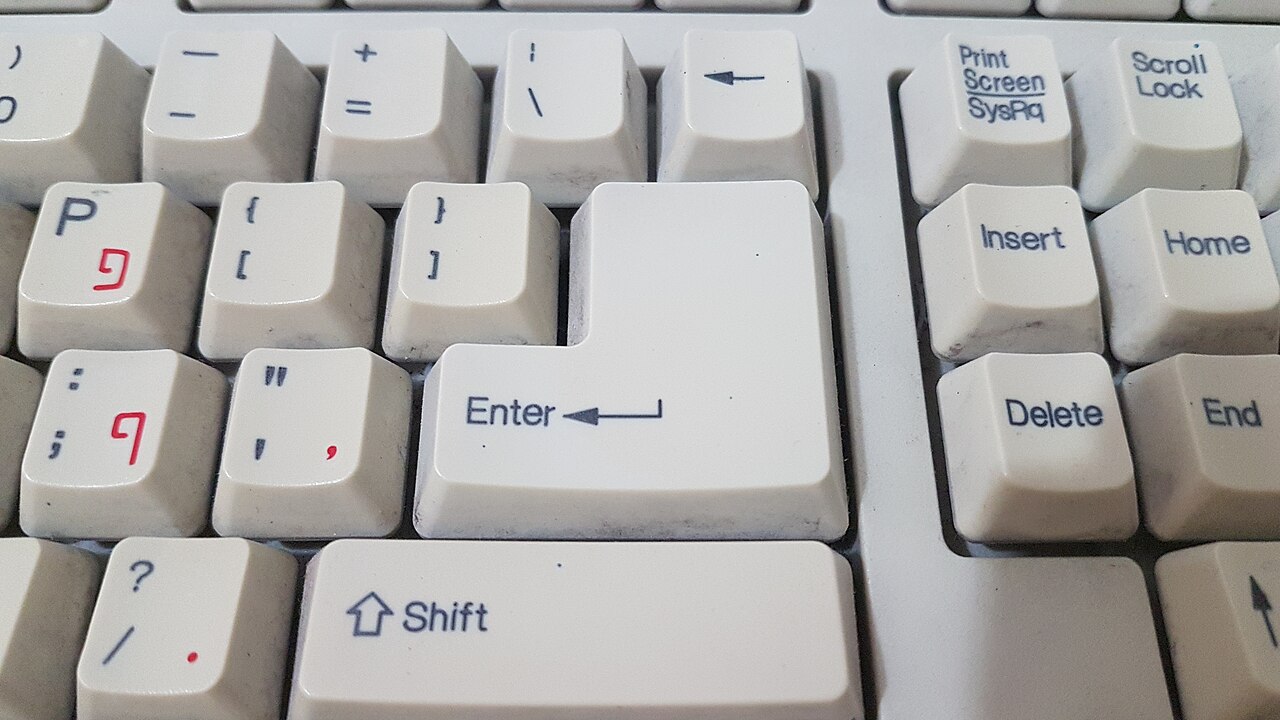
A Hebrew keyboard (מקלדת עברית, *mikledet ivrit*) uses one of two main layouts. The vast majority are bilingual, pairing Hebrew with Latin characters, typically in the U.S. QWERTY arrangement.
**Standard Hebrew keyboard** The standard Hebrew keyboard follows a 101/104-key design. Its layout, like QWERTY for English, comes from the order of letters on Hebrew typewriters. This layout is defined by the Israeli Standards Institution (SII) under SI-1452. The most recent update, from 2013, mainly adjusted the placement of diacritics and punctuation marks such as quotation marks and geresh. A notable quirk: paired delimiters—parentheses (), brackets [], braces {}, and angle brackets <>—are mapped in reverse logical order compared to left-to-right languages. The rendering engine’s BiDi mirroring then flips them back, so they look the same as on Latin keyboards. The key mapping follows the logical representation, not the physical one. For example, Shift-9 always produces a logical "open parenthesis"; on a right-to-left keyboard, this appears as the Unicode character U+0029 (right parenthesis: )), while on a left-to-right keyboard it’s U+0028 (left parenthesis: (). Arabic keyboards behave the same way. In a 102/105-key version, an extra backslash key sits to the right of the left Shift key. However, 102-key keyboards aren’t standard; only some manufacturers, like Logitech and Apple, sell European-style 102-key Hebrew keyboards. On Windows, Alt-Shift switches between layouts. Holding Shift or pressing Caps Lock produces the uppercase Latin letter without needing to change layouts.
**SI-1452-2 Improved Mapping** In 2018, SII released the SI-1452-2 "Improved Mapping" standard, also called *arkn* (ארקן) after the first four keys in the top-left corner. It’s mostly the same as SI-1452, with these changes: - Period (.), comma (,), apostrophe ('), and forward slash (/) moved to their QWERTY positions. Semicolon (;) stays put. - The letter ת takes ן’s place to move ן away from ו, which often caused confusion. - ץ and ן moved to the top-left area. - All Niqqud marks shifted to a Lyx-style layout, even on systems (like macOS) that don’t support it with SI-1452. - Added the rafe diacritic (◌ֿ) and two cantillation marks: meteg (◌ֽ) and ole (◌֫). - Added true Hebrew gershayim (״), quotes („”), and maqaf (־). - Added RLM and LRM characters on all systems.
- Standard layout codified
- SI-1452 by SII
- Latest revision year
- 2013
- Improved mapping standard
- SI-1452-2 (2018)
- Improved mapping also known as
- arkn (Hebrew: ארקן)
- Windows support start
- Windows 8
- X keyboard config support date
- August 2023
Lore & Background
Standard Hebrew keyboards have a 101/104-key layout. Like the standard English keyboard layout, QWERTY, the Hebrew layout was derived from the order of letters on Hebrew typewriters. The layout is codified in SI-1452 by SII. The latest revision, from 2013, mostly modified the location of the diacritics points and punctuation such as quotation marks and geresh. One noteworthy feature is that in the standard layout, paired delimiters—parentheses (), brackets [], braces {}, and angle brackets (less/greater than) <>—have the opposite logical representation from the standard in left-to-right languages. This gets flipped again by the rendering engine's BiDi mirroring algorithm, resulting in the same visual representation as in Latin keyboards. Key mappings follow the logical rather than the physical representation. For instance, whether on a right-to-left or left-to-right keyboard, Shift-9 always produces a logical 'open parenthesis'. On a right-to-left keyboard, this is written as the Unicode character U+0029, 'right parenthesis': ). This is true on Arabic keyboards as well. On a left-to-right keyboard, this is written as the Unicode character U+0028, 'left parenthesis': (.
In 2018, SII published the SI-1452-2 'Improved Mapping' standard. This layout is also known as arkn (Hebrew: ארקן) after the four consecutive keys in the top left of the keyboard. It is mostly identical to the SI-1452 layout, with changes including moving punctuation marks to QWERTY positions, relocating certain letters, adding niqqud marks, and adding characters such as true Hebrew gershayim, quotes, maqaf, multiplication and division signs. The improved mapping is provided by X Keyboard Config since August 2023, but as of November 2023 has no support on MacOS. Users whose system doesn't provide the mapping are able to download it from mikladot.com.
There are also a variety of layouts that follow the phonology of the letters on a Latin-character keyboard such as QWERTY or AZERTY. These are commonly known as 'Hebrew-QWERTY' or 'French AZERTY-Hebrew' layouts. While not well standardized, macOS comes with a Hebrew-QWERTY variant, and software layouts for Microsoft Windows can be found on the Internet.
Reader's Guide
The Hebrew keyboard is notable for its dual-layout system, balancing the needs of Hebrew and Latin script users. The standard SI-1452 layout, derived from Hebrew typewriters, addresses the unique challenges of right-to-left text, particularly in the handling of paired delimiters and BiDi mirroring. The 2013 revision sought to rectify earlier ambiguities in niqqud input, which had been obscure and rarely used, by adding niqqud and other marks to a third layer with AltGr. The 2018 improved mapping further refined the layout by aligning punctuation with QWERTY positions and adding useful characters. The layout's significance extends to its support across operating systems: Windows has supported SI-1452 since Windows 8, and Linux switched to it after release, deprecating the Lyx layout. The existence of Hebrew-QWERTY layouts and the availability of stickers and printed keyboards demonstrate the ongoing adaptation to user preferences. The article notes that the improved mapping had no support on MacOS as of November 2023, highlighting platform fragmentation. Overall, the Hebrew keyboard exemplifies the complexities of designing input methods for bidirectional text and the iterative standardization process.
Did You Know?
- In the standard layout, Shift-9 always produces a logical 'open parenthesis', which on a right-to-left keyboard is written as Unicode U+0029 (right parenthesis).
- The 2013 revision of SI-1452 added niqqud and other marks mostly to layer 3, with AltGr pressed, to avoid changing the first two shifting layers.
- The improved mapping (SI-1452-2) is also known as 'arkn' after the four consecutive keys in the top left of the keyboard.
- On Windows, Alt-Shift switches between keyboard layouts, and holding Shift or pressing Caps Lock produces uppercase Latin letters without switching layouts.
Origins and the Typewriter Legacy
The Hebrew keyboard exists in two distinct layout families, and the vast majority of physical keyboards sold today are bilingual, pairing Hebrew characters with a Latin alphabet—typically the familiar U.S. QWERTY arrangement. The standard Hebrew layout occupies a 101- or 104-key form factor and traces its letter ordering directly back to the sequence found on early Hebrew typewriters, much as QWERTY itself grew out of mechanical typewriter design. The entire arrangement is formally codified under standard SI-1452, published by the Standards Institution of Israel (SII). A significant revision arrived in 2013, which primarily reshuffled the positions of diacritical points and punctuation symbols such as quotation marks and the geresh. For users on Windows, switching between the Hebrew and Latin layers is handled by Alt-Shift, while simply holding a Shift key or pressing Caps Lock yields the uppercase Latin letter without requiring a full layout switch. On the rarer 102-key variant, an extra backslash key appears to the right of the left Shift key, a configuration that certain manufacturers like Logitech and Apple have chosen to offer in a European-style form.
The Mirrored Delimiter Paradox
One of the most intellectually fascinating quirks of the standard Hebrew layout involves how paired delimiters—parentheses, brackets, braces, and angle brackets—are assigned. In a right-to-left script, the logical open and close roles are reversed compared to left-to-right languages, so the physical key positions carry the opposite logical meaning. However, the rendering engine's BiDi mirroring algorithm then flips the visual output back, so the final on-screen appearance matches what a Latin keyboard user would expect. The underlying principle is that key mappings always follow the logical representation rather than the physical one. For example, pressing Shift-9 on any keyboard—whether Hebrew, Arabic, or English—always produces a logical open parenthesis. On a right-to-left keyboard that logical character is encoded as Unicode U+0029, the right parenthesis glyph, while on a left-to-right keyboard it is encoded as U+0028, the left parenthesis glyph. This elegant two-step inversion ensures visual consistency across scripts while preserving the correct logical structure for text processing.
The arkn Revolution
In 2018, the Standards Institution of Israel released SI-1452-2, a revised mapping that enthusiasts and typists quickly nicknamed arkn after the four consecutive Hebrew letters occupying the top-left corner of the keyboard. The new layout is largely a refinement of its predecessor, but the changes are meaningful. Punctuation marks—period, comma, apostrophe, and forward slash—were relocated to the same positions they hold on a QWERTY keyboard, while the semicolon stayed put. The letters ת and ן swapped places to pull ן away from ו, a proximity that had long caused typing confusion. ץ and ן were repositioned toward the top-left cluster. All Niqqud marks were consolidated into a Lyx-style arrangement, even on operating systems like macOS where the older SI-1452 layout did not support that style. The revision also introduced the rafe diacritic, the cantillation marks meteg and ole, true Hebrew gershayim, proper quotation marks, the maqaf hyphen, RLM and LRM directional characters, and the multiplication and division signs. X Keyboard Config has offered the improved mapping since August 2023, though macOS still lacks native support as of late 2023, with users able to download the layout from mikladot.com.
The Niqqud Struggle and Its Resolution
For years, inputting Niqqud—vowel points and cantillation marks essential to Biblical and liturgical Hebrew—was an obscure and frustrating ordeal on the standard keyboard. The pre-2013 version of SI-1452 contained a language ambiguity that led most manufacturers to a de facto compromise: pressing Shift plus an upper-row key produced the same punctuation as a U.S. keyboard, leaving Niqqud relegated to a far more convoluted sequence, typically Caps Lock followed by Shift plus the relevant key. The combination was so arcane, and Niqqud so rarely needed in everyday modern Hebrew, that most typists never even discovered it existed. Those who did rarely bothered to memorize the arbitrary positions of individual marks. Instead, people turned to virtual on-screen keyboards found on websites or built into their operating systems. The 2013 revision of SI-1452 finally addressed both problems by placing Niqqud and additional marks on the third shifting layer, accessed with AltGr, while deliberately leaving the first two layers untouched for backward compatibility. Separately, SIL International developed a Tiro-based standard that positions Niqqud along the home-row keys, and Linux ships with an Israel – Biblical Hebrew (Tiro) layout as a standard option.
Gallery
Frequently Asked Questions
Who is Hebrew keyboard?
The Hebrew keyboard (mikledet ivrit) is a bilingual input layout that pairs Hebrew script with Latin characters, most commonly arranged in the U.S. QWERTY pattern. Its standard form is codified by the Israeli Standards Institution under standard SI-1452.
What are Hebrew keyboard's powers/role?
It follows a 101/104-key design whose letter ordering was inherited directly from the sequence used on early Hebrew typewriters. This makes it the primary way Hebrew-speaking users type both Hebrew and English on a single physical board.
Why is Hebrew keyboard important?
It is the officially standardized way to type Hebrew on personal computers, ensuring consistent key positions across Israeli devices. Without the SII codification, every manufacturer could place letters differently, fragmenting the user experience.
What is arkn and how does it relate to Hebrew keyboard?
Arkn (אָרְקָן) is the Hebrew name for the improved mapping standard SI-1452-2, published in 2018 as an update to the original SI-1452. It refines how certain characters map to keys beyond what the 2013 revision covered.
More in Computer Keyboards, Part 3 1-24
Spotted an error? Know more?
Reader corrections go straight into our review queue. Suggest an edit · How this site is sourced