
Dzongkha keyboard layout
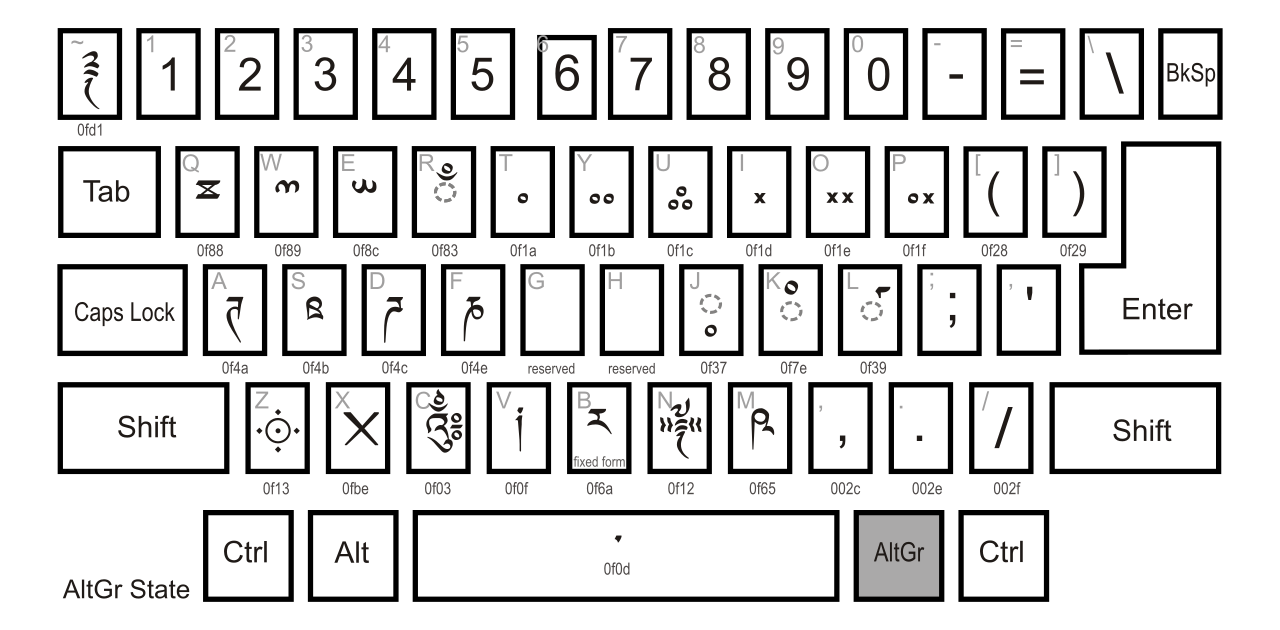
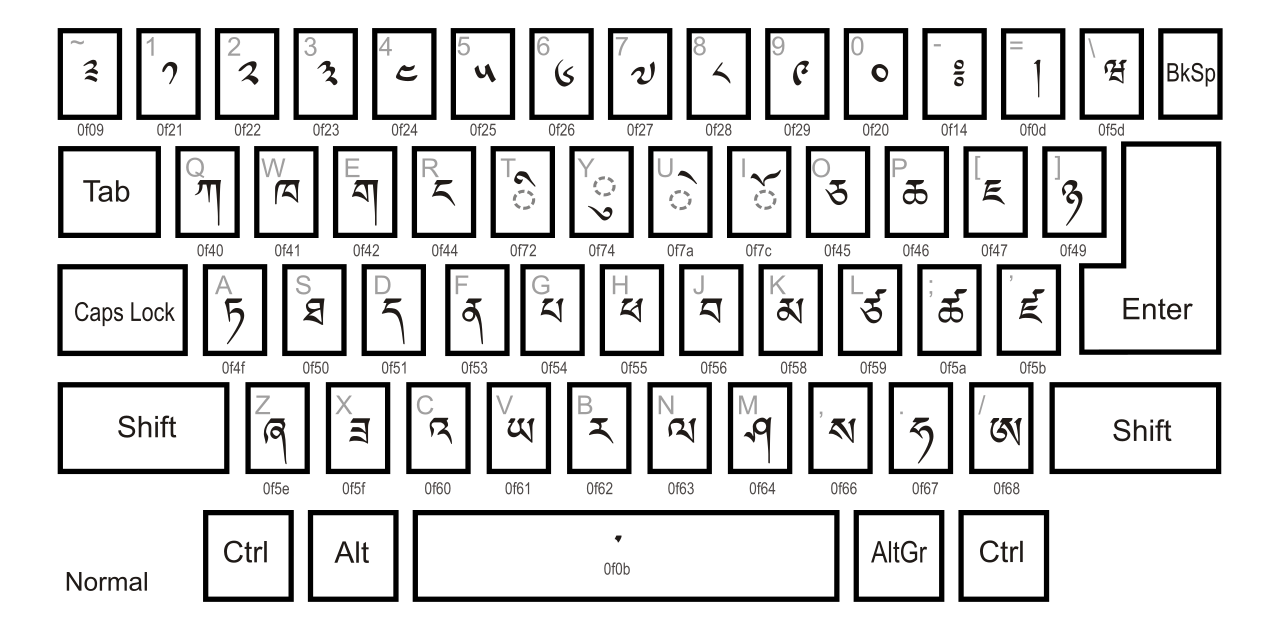
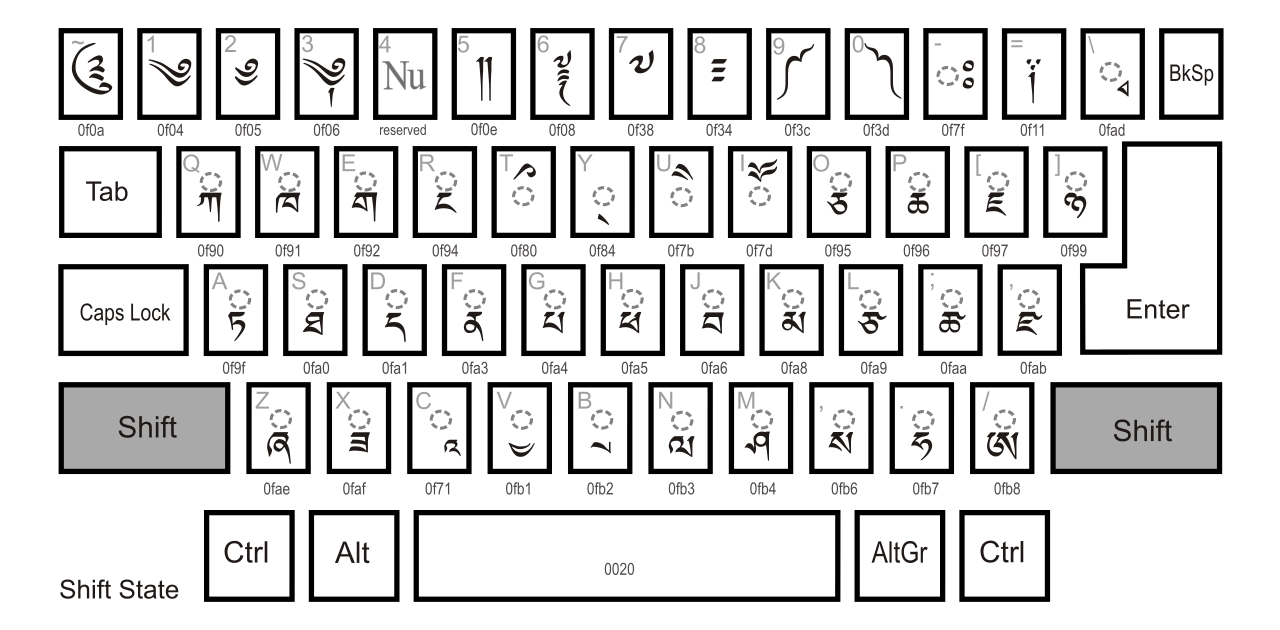
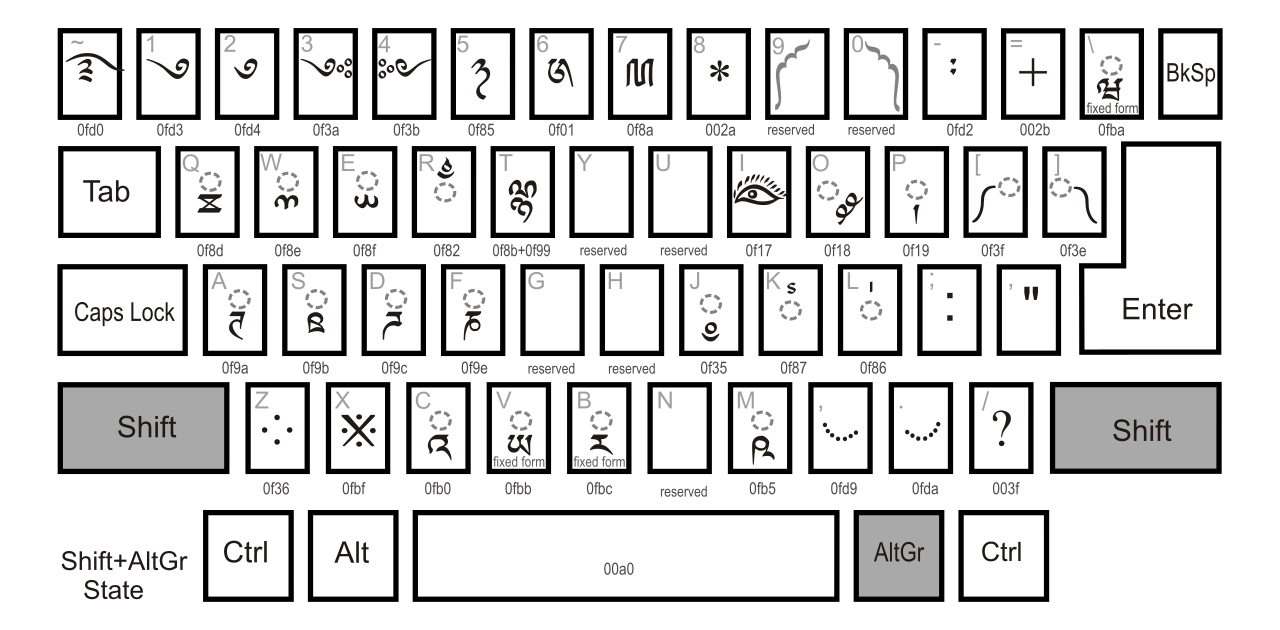
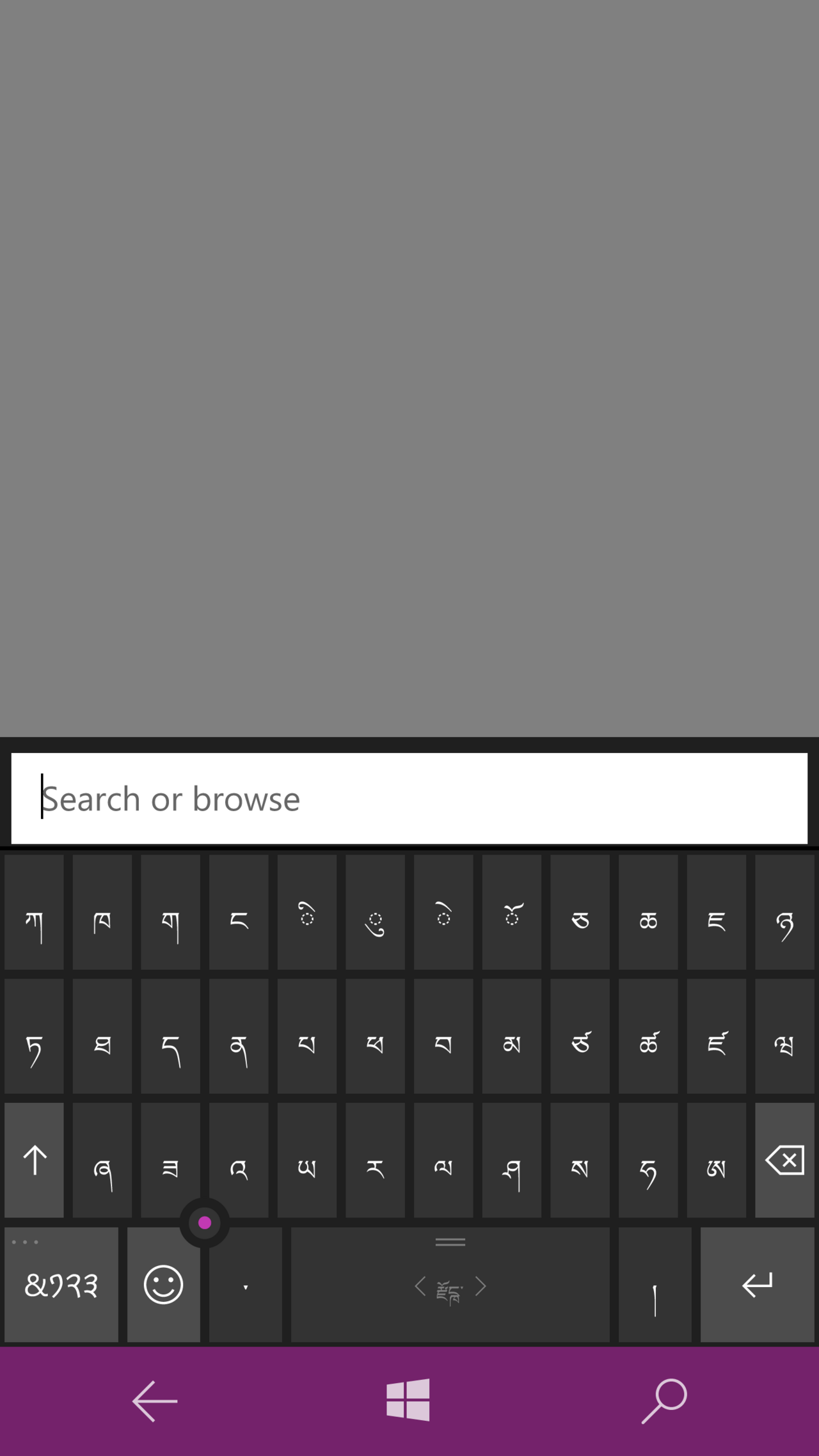
Standardized keyboard layout for Dzongkha and classical Tibetan input.

The Microsoft Corporation (MSFT). · Public domain
The Dzongkha keyboard layout scheme is a standardized method for inputting Dzongkha and classical Tibetan text on computers. It is notable for being designed by the Dzongkha Development Commission and the Department of Information Technology and Telecom of the Royal Government of Bhutan, and for its inclusion in the XFree86 distribution.
- Standardized by
- Dzongkha Development Commission (DDC) and Department of Information Technology and Telecom (DITT) of the Royal Government of Bhutan
- Initial standardization year
- 2000
- Update year
- 2009
- Update reason
- to accommodate additional characters added to the Unicode & ISO 10646 standards
- Layout code
- dz-BT
- Included in distribution
- XFree86
Lore & Background
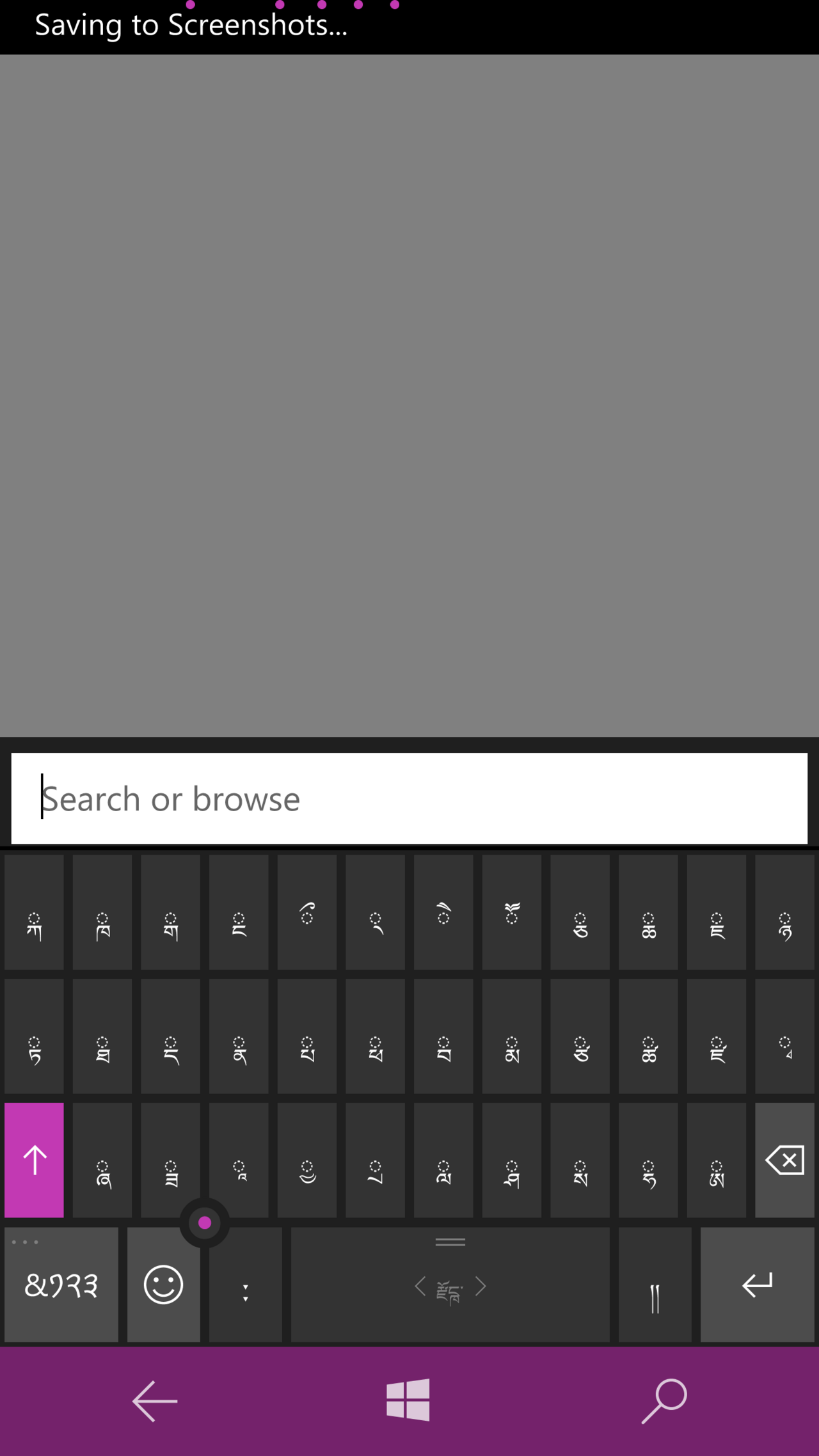
The Dzongkha keyboard layout scheme was standardized in 2000 by the Dzongkha Development Commission and the Department of Information Technology and Telecom of the Royal Government of Bhutan. It was updated in 2009 to accommodate additional characters added to the Unicode and ISO 10646 standards since the initial version. The arrangement of keys essentially follows the usual order of the Dzongkha and Tibetan alphabet, allowing the layout to be quickly learned by anyone familiar with this alphabet. Subjoined (combining) consonants are entered using the Shift key. The Dzongkha (dz) keyboard layout is included in the XFree86 distribution.
Reader's Guide
The Dzongkha keyboard layout is significant as a standardized input method for Dzongkha and classical Tibetan text, developed by the Dzongkha Development Commission and the Department of Information Technology and Telecom of the Royal Government of Bhutan. Its design, which follows the usual order of the Dzongkha and Tibetan alphabet, facilitates rapid learning for those familiar with the script. The layout's inclusion in the XFree86 distribution ensures its availability on many Unix-like systems. The 2009 update reflects ongoing alignment with evolving Unicode and ISO 10646 standards. The use of the Shift key for subjoined consonants is a key characteristic. The layout is identified by the code dz-BT. Its legacy is tied to the official efforts of Bhutan's government to support digital use of the national language.
The Three Dimensions of a Dzongkha Layout
A Dzongkha keyboard layout, like any other, can be understood through three distinct lenses: physical, visual, and functional. The physical dimension refers to where the actual key switches sit on the board—their spatial arrangement. The visual dimension concerns what is printed or engraved on each keycap, the legends that tell the typist which character will appear. The functional dimension is the software-defined mapping that links a particular key press, or combination of presses, to a specific action or character output. These three layers operate independently of one another. A physical keyboard built for one writing system can be reinterpreted by the operating system to produce Dzongkha characters simply by altering the mapping table in software or firmware. This separation means the same hardware can serve multiple languages, and a user can switch layouts through system settings without replacing any physical components. Most modern USB and wireless keyboards even report their default visual layout to the OS automatically upon connection, making the transition between writing systems a matter of configuration rather than construction.
The Scancode-to-Character Pipeline
When any key on a modern computer keyboard is pressed or released, the device does not transmit the character printed on its surface. Instead, it sends a scancode identifying only the row and column position of that key within the matrix. The operating system then consults a keyboard mapping table—essentially a scancode-to-character conversion table—to translate that positional code into a specific binary character code. This architecture is what makes a Dzongkha layout possible on the same hardware that produces Latin, Cyrillic, or Greek text. The physical key-top symbol and the character that ultimately appears in a document need not match at all; the software layer in between determines the output. Users can typically change this mapping through system settings, and third-party software can further extend or modify keyboard functionality. Some keyboards even carry firmware capable of configuring layouts internally, alongside customizing lighting and other peripheral functions. The result is a system where the hardware remains language-agnostic and the software carries the linguistic identity.
The Core Typing Section
At the heart of any keyboard, including one configured for Dzongkha, lies the character-key section. This core area typically comprises three rows for letters and punctuation, a top row for digits and special symbols, and a Space bar anchoring the bottom. The spatial positioning of these character keys mirrors the arrangement found on a traditional typewriter keyboard, a heritage that persists across virtually every modern layout regardless of the writing system it serves. While different keyboard models vary in total key count and the precise positioning of individual keys, most layouts localized for non-English languages differ primarily in their keycap legends rather than in the physical placement of the keys themselves. This means the underlying grid remains familiar to typists, and the adaptation to a new script like Dzongkha is accomplished through the visual and functional layers—what is printed on the caps and what the software maps to each position—rather than through a fundamentally different physical geometry.
Modifier Keys and Multi-Level Character Access
Beyond the straightforward character keys, a keyboard incorporates modifier keys that produce no output on their own but alter the function of other keys when held simultaneously. The Shift key, for instance, toggles between the lower and upper symbols engraved on a keycap, or between lowercase and capital letters. For languages requiring additional characters beyond the two levels provided by a key and its Shift variant, the AltGr (alternative graphic) key—positioned to the right of the space bar on most non-US layouts—unlocks a third level of symbols. Combining AltGr with Shift can reveal a fourth level. These extra symbols may be engraved on the right half of the key top or left entirely unmarked. On Apple keyboards, the Option key fulfills a role analogous to AltGr, while the Command key handles functions similar to Ctrl and Alt. The Fn key, found on modern Mac keyboards and many smaller Windows or Linux laptops, adds yet another layer, switching function keys between standard F-key behavior and media or system controls. Together, these modifiers ensure that a compact set of physical keys can access a rich and complete character repertoire.
Gallery
Frequently Asked Questions
Who is Dzongkha keyboard layout?
The Dzongkha keyboard layout is a standardized typing scheme created by Bhutan's Dzongkha Development Commission together with the Department of Information Technology and Telecom of the Royal Government of Bhutan, first formalized in 2000 to let users produce Dzongkha and classical Tibetan text on a computer.
What are Dzongkha keyboard layout's powers/role?
Its job is to map physical key presses to Dzongkha and classical Tibetan characters so that an operating system can render the correct glyphs, and it is identified in system configuration files by the layout code dz-BT.
Why is Dzongkha keyboard layout important?
It gives Dzongkha speakers and classical Tibetan readers a government-backed, standardized way to type in their language, which was a critical step for bringing those scripts into everyday digital use in Bhutan.
Which distribution ships Dzongkha keyboard layout out of the box?
The layout is bundled with the XFree86 display-server distribution, so users of that X Window System implementation get Dzongkha and classical Tibetan input support without installing anything extra.
More in Computer Keyboards, Part 3 1-24
Spotted an error? Know more?
Reader corrections go straight into our review queue. Suggest an edit · How this site is sourced