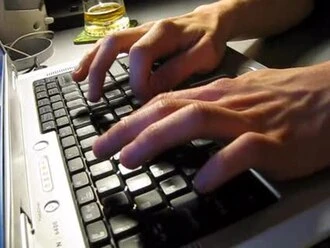
Keyboard buffer
Memory section holding keystrokes before processing.

Raimond Spekking · CC BY-SA 4.0
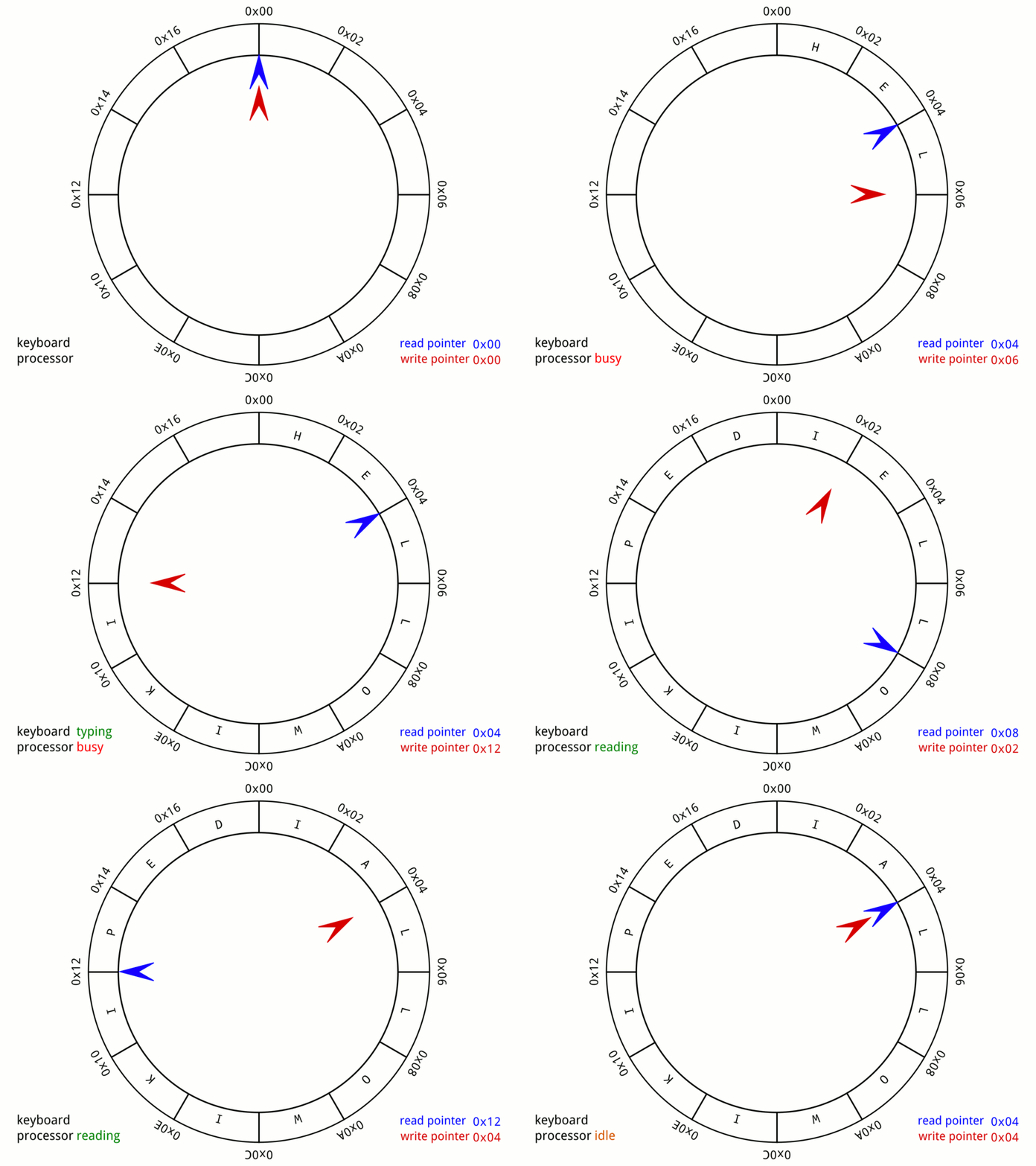
A keyboard buffer is a reserved area of computer memory that temporarily stores keystrokes until the system is ready to process them. This technique has long been used in command-line processing: as a user types a command, the characters appear on the terminal and can be edited before the computer acts on them.
In time-sharing systems, where the buffer is located depends on whether communication is full-duplex or half-duplex. With full-duplex, keystrokes are sent one at a time. When the main computer receives each keystroke, it usually adds the corresponding character to the end of the keyboard buffer. The exception is control characters like "delete" or "backspace," which remove the last character in the buffer to correct mistakes. In half-duplex systems, keystrokes are echoed locally on the terminal. The user sees and edits the command line on their own screen before it is transmitted to the main computer, so the buffer resides locally.
On some early home computers, to reduce hardware requirements, a CPU interrupt would check the keyboard's switches for key presses several times per second. It recorded those presses in a keyboard buffer for the operating system or application software to read. On certain systems, if too many keys are pressed at once, the keyboard buffer overflows and the computer's internal speaker emits a beep.
From the user's perspective, the use of keyboard buffers is sometimes known as typeahead.
- Buffer location full duplex
- main computer
- Buffer location half duplex
- local terminal
- Control characters handled
- delete, backspace
- Overflow indicator
- beep from internal speaker
Lore & Background
Keyboard buffers have long been used in command-line processing. As a user enters a command, they see it echoed on their terminal and can edit it before it is processed by the computer. In time-sharing systems, the location of the buffer depends on whether communications is full-duplex or half-duplex. In full-duplex systems, keystrokes are transmitted one by one; as the main computer receives each keystroke, it ordinarily appends the character to the end of the keyboard buffer, except for control characters like 'delete' or 'backspace' which delete the last character. In half-duplex systems, keystrokes are echoed locally on a computer terminal, allowing the user to edit the command line before transmission, so the buffer is local.
On some early home computers, to minimize necessary hardware, a CPU interrupt checked the keyboard's switches for key presses multiple times each second and recorded the key presses in a keyboard buffer for the operating system or application software to read. On some systems, if the user presses too many keys at once, the keyboard buffer overflows and emits a beep from the computer's internal speaker. The use of keyboard buffers is sometimes known from the user experience side as typeahead.
Reader's Guide
The keyboard buffer's significance lies in its fundamental role in enabling efficient command-line interaction and time-sharing computing. By holding keystrokes before processing, it allows users to edit commands in real time, whether the buffer resides on the main computer (full-duplex) or locally on the terminal (half-duplex). This distinction shaped early network and terminal design. The buffer also handles control characters like delete and backspace, which correct typing mistakes by removing the last character. On early home computers, the buffer was essential for managing keyboard input with minimal hardware, using CPU interrupts to poll key switches. The overflow condition—where too many simultaneous key presses cause a beep—highlights a practical limitation. The concept of typeahead, where users can type ahead of processing, further demonstrates the buffer's impact on user experience. Overall, the keyboard buffer was a critical component in the evolution of interactive computing, enabling smoother input handling across diverse systems.
Did You Know?
- In full-duplex systems, control characters like delete or backspace delete the character at the end of the buffer.
- In half-duplex systems, the keyboard buffer is local to the terminal.
- On some early home computers, a CPU interrupt checked keyboard switches multiple times per second to fill the buffer.
- If too many keys are pressed at once, the keyboard buffer may overflow and emit a beep from the internal speaker.
The Heart of Command-Line Interaction
A keyboard buffer occupies a dedicated slice of computer memory whose sole purpose is to temporarily store keystrokes before the system acts on them. This seemingly simple mechanism has been a cornerstone of command-line processing for decades. When a user sits at a terminal and begins typing a command, each character they strike is captured and held in this buffer. The system echoes the text back onto the screen, giving the user a live view of what they are composing. Crucially, this arrangement grants the user a window to review and edit the command line before it is ever handed off to the computer for execution. Rather than forcing immediate, irreversible processing of every keystroke, the buffer introduces a pause between input and action. This pause is what makes interactive computing feel natural: the user can correct a typo, restructure a phrase, or simply think before committing. Without this holding area, every keypress would demand instant interpretation, eliminating the flexibility that makes command-line interfaces both powerful and forgiving.
Full-Duplex vs. Half-Duplex: Where the Buffer Lives
In time-sharing environments, the physical location of the keyboard buffer is not arbitrary; it is dictated by the communication mode between the terminal and the main computer. In a full-duplex setup, the link supports simultaneous bidirectional traffic, so keystrokes travel one at a time from the user's machine to the central processor. As each character arrives, the main computer typically appends it to the tail of its own keyboard buffer. Special control characters, such as delete or backspace, break this simple appending rule. Instead of adding a new character, they instruct the system to strip the last character from the buffer, effectively correcting a typing error in real time. By contrast, a half-duplex link cannot carry data in both directions at once. Here the terminal echoes keystrokes locally on the user's own screen, and the user edits the command line on their side before the finished string is transmitted to the main computer. In this arrangement, the buffer resides locally at the terminal rather than on the central machine, shifting the responsibility for editing and correction to the user's immediate environment.
Hardware-Efficient Design in Early Home Computers
On certain early home computers, engineers faced tight constraints on available hardware and had to be inventive about how keyboard input was captured. Rather than dedicating a separate chip or complex circuitry to reading the keyboard, these systems relied on a CPU interrupt mechanism. The processor would pause its current task multiple times each second to check the state of the keyboard's physical switches. If a key had been pressed, the corresponding character was recorded into a keyboard buffer in memory. This buffer then served as a shared repository that the operating system or any running application software could read at its convenience. The elegance of this approach lay in its minimalism: no extra hardware was required beyond the switches themselves and the interrupt logic already present in the CPU. The buffer acted as a simple mailbox between the hardware-level detection and the software-level interpretation, allowing the operating system to poll for new input without the user having to wait for a dedicated input cycle. This design philosophy reflected the broader ethos of early personal computing, where clever software solutions substituted for expensive dedicated components.
Typeahead and the Overflow Beep
From the user's perspective, the keyboard buffer is often experienced under the name typeahead. This term captures the sensation of typing ahead of the system's processing: the user can continue striking keys while the computer is still working on the previous input, and those characters simply wait in the buffer. The feature makes rapid typing feel fluid and uninterrupted. However, the buffer is not infinitely deep. On some systems, if a user presses too many keys in quick succession, the buffer reaches its capacity and overflows. The system's response to this overflow is a distinctive beep emitted from the computer's internal speaker. This audible warning signals that the buffer can no longer accept additional characters, effectively telling the user to slow down or wait for the system to drain the queue. The beep, while simple, serves as an important feedback mechanism in an era before graphical indicators or status bars were common. It is a small but memorable detail of the keyboard buffer's role: a quiet guardian of memory that occasionally raises its voice when pushed past its limits.
Gallery
Frequently Asked Questions
What is a keyboard buffer?
A keyboard buffer is a dedicated slice of memory set aside to hold keystrokes in a temporary queue. It keeps every character you type safe until the operating system or application is ready to read and act on them.
Where does the keyboard buffer live in a time-sharing setup?
Its placement depends on the communication mode between terminal and host. In a full-duplex link the buffer sits on the main computer, while in a half-duplex arrangement it resides at the local terminal.
How does a keyboard buffer let me fix a typo before pressing Enter?
Because the characters are simply queued in memory rather than executed immediately, you can issue editing commands such as backspace or delete to remove or reposition characters. The buffer holds the corrected line until you explicitly submit it.
What signals the user when the keyboard buffer is full?
When the reserved storage area reaches capacity, the system typically emits a beep from the internal speaker. This overflow alert warns the user that no further keystrokes can be buffered until space is freed.
Why was the keyboard buffer important for early command-line interfaces?
It decoupled the act of typing from the act of processing, giving users a chance to review and edit a full command before the computer acted on it. Without that holding area, every keystroke would have been final the instant it was struck.
More in Computer Keyboards 1-24
Spotted an error? Know more?
Reader corrections go straight into our review queue. Suggest an edit · How this site is sourced