Emulator
An emulator lets one system imitate another to run its software.

An emulator is a piece of hardware or software that makes one computer system—the host—act like another system, known as the guest. Its main job is to let the host run programs or use peripherals originally built for the guest. In a broader sense, emulation is when a program on an electronic device mimics another program or device.
For instance, many printers are built to copy the behavior of HP LaserJet printers, since a lot of software was written specifically for those models. If a non-HP printer emulates an HP one, any software meant for the real HP printer will work on the non-HP device and produce the same output. Since at least the 1990s, video game fans have used emulators to play classic 1980s arcade games by having a modern system interpret the original machine code and data from those games. They also use emulators to mimic old video game consoles.
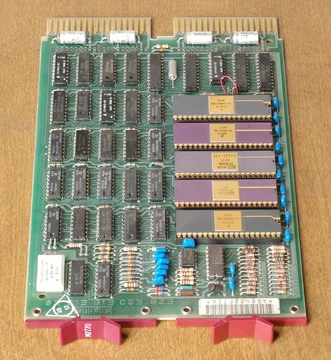
A hardware emulator is an emulator that exists as a physical device. Examples include the DOS-compatible card found in some 1990s Macintosh computers (like the Centris 610 or Performa 630), which let them run PC software, as well as field-programmable gate array-based hardware emulators. The Church–Turing thesis suggests that, in theory, any operating environment can be emulated inside any other environment, as long as you ignore memory limits. In practice, though, this can be very hard, especially when the exact behavior of the system being emulated isn't documented and must be figured out through reverse engineering. The thesis also doesn't address timing; if the emulator runs slower than the original hardware, the software inside the emulation may crawl, possibly triggering timer interrupts that change how it behaves.
Can a Commodore 64 emulate MS-DOS? Yes, it's possible for a Commodore 64 to emulate an IBM PC (which uses MS-DOS), in the same way it's possible to bail out Lake Michigan with a teaspoon.
Most emulators only mimic a hardware architecture—if the desired software needs an operating system or firmware, that must be provided separately (and may also be emulated). Both the OS and the software are then interpreted by the emulator, not run by the native hardware. Along with this interpreter for the emulated machine's language, other hardware (like input or output devices) must be provided in virtual form.
- Legal precedent
- Sega v. Accolade 977 F.2d 1510 (9th Cir. 1992)
- Legal precedent 2
- Sony Computer Entertainment, Inc. v. Connectix Corporation 203 F.3d 596 (2000)
- Legal precedent 3
- Sony Computer Entertainment America v. Bleem 214 F.3d 1022 (2000)
- Legal precedent 4
- Lewis Galoob Toys, Inc. v. Nintendo of America, Inc., 964 F.2d 965 (9th Cir. 1992)
- First functional simulator
- Autonetics about 1960 for testing assembly language programs for military computer D-17B
Lore & Background
Many printers, for example, are designed to emulate HP LaserJet printers because a significant amount of software is written specifically for HP models. Since at least the 1990s, many video game enthusiasts and hobbyists have used emulators to play classic arcade games from the 1980s using the games' original machine code and data. A hardware emulator takes the form of a hardware device, such as the DOS-compatible card installed in some 1990s-era Macintosh computers like the Centris 610 or Performa 630, which allowed them to run PC software programs.
Most emulators emulate a hardware architecture; if operating system firmware or software is required, it must be provided as well. Both the OS and the software are interpreted by the emulator rather than run by native hardware. Sufficient emulation of some platforms requires extreme accuracy down to individual clock cycles, undocumented features, and implementation bugs, particularly with classic home computers like the Commodore 64. In contrast, some platforms like the PlayStation 4 have had little direct hardware addressing, so a simple compatibility layer may suffice.
Video game console emulators are programs that allow a personal computer or video game console to emulate another video game console. They are most often used to play older 1980s to 2000s-era video games on modern systems. Examples include RPCS3, Dolphin, Cemu, PCSX2, PPSSPP, ZSNES, Citra, ePSXe, Project64, Visual Boy Advance, Nestopia, and Yuzu. Due to their popularity, emulators have been impersonated by malware, often making currently impossible claims such as being able to run Xbox One and Xbox 360 games in a single program.
Reader's Guide
Emulation has notable significance in preserving access to software and games designed for older or discontinued hardware. The article notes that since at least the 1990s, video game enthusiasts have used emulators to play classic arcade games from the 1980s by interpreting the original machine code on current-era systems. Emulators also allow developers of software for embedded systems or video game consoles to design and test software on simulators before the final hardware exists in large quantities, avoiding the side effects of a debugger. In many cases, the simulator is produced by the hardware company itself, theoretically increasing accuracy.
Legally, emulation is established as legal within the United States according to precedents such as Sega v. Accolade, Sony v. Connectix, and Sony v. Bleem. However, unauthorized distribution of copyrighted code remains illegal under international copyright law. Under U.S. law, obtaining a dumped copy of the original machine's BIOS is legal as fair use if the user obtained a legally purchased copy of the machine, per Lewis Galoob Toys, Inc. v. Nintendo of America, Inc. The article also notes that the Internet has helped spread console emulators, as most would be unavailable for sale in retail outlets. Emulators have also been impersonated by malware, with some making currently impossible claims about emulating modern consoles.
Did You Know?
- The Church–Turing thesis implies that theoretically, any operating environment can be emulated within any other environment, assuming memory limitations are ignored.
- The first functional simulator was written by Autonetics about 1960 for testing assembly language programs for the military computer D-17B.
The Core Idea and Its Theoretical Foundation
Emulation is the process by which one computing system, the host, imitates the behavior of another, the guest, allowing software and peripherals designed for the guest to function on the host. The Church-Turing thesis provides a theoretical underpinning: given sufficient memory, any operating environment can in principle be reproduced within any other. Yet theory and practice diverge sharply. When the target system's exact behavior is undocumented, engineers must reverse-engineer its quirks. Timing is another critical variable—an emulator that falls behind the original hardware's speed can trigger timer interrupts that cascade into altered program behavior. Hardware emulators take physical form, such as the DOS-compatible cards once installed in 1990s Macintosh models like the Centris 610 and Performa 630, letting those machines execute PC software, or field-programmable gate array-based devices. Software emulators, by contrast, interpret the guest's machine code directly on the host's processor, bridging architectural gaps without dedicated silicon.
A Spectrum of Fidelity
Not all emulation demands the same depth of accuracy. At one extreme, platforms like the Commodore 64 require emulation precise down to individual clock cycles, undocumented hardware features, unpredictable analog behavior, and even implementation bugs. This is because the C64's software ecosystem—game programmers and the demoscene—relied heavily on sophisticated low-level tricks that exploited every quirk of the hardware. At the opposite end, systems such as the PlayStation 4 saw very little direct hardware addressing in their software, meaning a straightforward compatibility layer that translates foreign system calls into native ones can suffice. The Nintendo 64's fully programmable graphics processor illustrates a middle path: although the GPU was theoretically flexible, most titles used a small set of pre-made programs communicating via FIFO, so many emulators skip GPU emulation entirely and simply interpret CPU commands as the original program would. The depth of emulation required is thus dictated by how intimately the target platform's software touches its underlying hardware.
Preservation, Compatibility, and Everyday Use
Emulation has quietly shaped everyday computing for decades. A classic example is printer compatibility: many non-HP printers are designed to emulate HP LaserJet models because a vast body of software was written specifically for HP hardware. Once a printer presents itself as an HP device, any HP-targeted print software produces equivalent results on the non-HP machine. In the gaming world, since at least the 1990s, enthusiasts and hobbyists have used emulators to run classic 1980s arcade games on modern systems, interpreting the original machine code and data without needing the vintage hardware. Math co-processor emulators serve a similar bridging role, letting programs compiled with floating-point instructions execute on CPUs lacking a dedicated co-processor; when the CPU encounters a co-processor instruction it raises a not-available interrupt, the emulator routines handle the computation, and the program resumes. These applications show emulation as a practical tool for extending compatibility across generations and architectures.
Simulators and the Road Before Hardware
Before a chip is fabricated or a console ships, developers need a way to test their software. Simulators—especially accurate emulators often produced by the hardware vendor itself—fill that gap, allowing programmers to build and debug code without the time-consuming process of copying programs to physical hardware or introducing debugger side effects. This is particularly vital for embedded systems and video game consoles, where large hardware quantities may not yet exist. The roots of this practice stretch back to around 1960, when Autonetics wrote the first functional simulator to test assembly-language flight programs destined for the military D-17B computer, enabling those programs to be written, executed, and verified before the hardware was even built. Autonetics also developed a functional simulator for flight programs for later execution in other systems. Logic simulation extends the idea further, using software to model the operation of a digital circuit after it has been described in logic equations but before physical fabrication. Functional simulation, meanwhile, executes symbolic assembly or compiler-language code rather than binary machine code, letting programmers trace specific source sections to hunt for bugs without generating any binary at all.
Frequently Asked Questions
What exactly is an emulator in PC hardware?
An emulator is hardware or software that makes a host system behave like a different target system (the guest), so programs and peripherals originally built for the guest can run on the host. In a broader sense, it is any program that mimics the behavior of another program or device.
Can you give a concrete example of how emulation works in practice?
Many non-HP printers are engineered to copy the behavior of HP LaserJet models because a large body of software was written specifically for those printers. When a non-HP printer emulates an HP one, the HP-specific software runs on the non-HP device without any changes.
When was the first functional emulator built?
The earliest known functional simulator was created by Autonetics around 1960. It was used to test assembly-language programs for the military computer D-17B.
Are emulators legal to build and use?
Multiple U.S. court rulings have established that emulators can be lawful. Precedents such as Sega v. Accolade (1992), Sony v. Connectix (2000), and Sony v. Bleem (2000) all addressed the legality of reverse-engineering for compatibility, while Galoob v. Nintendo (1992) dealt with related interoperability questions.
Why do emulators matter to the PC hardware community?
Emulators let one system run software and peripherals designed for a completely different platform, preserving access to legacy tools and preventing vendor lock-in. They also broaden compatibility so users are not forced to buy a specific manufacturer's hardware just to run a given program.
More in PC Hardware 1-24
Spotted an error? Know more?
Reader corrections go straight into our review queue. Suggest an edit · How this site is sourced