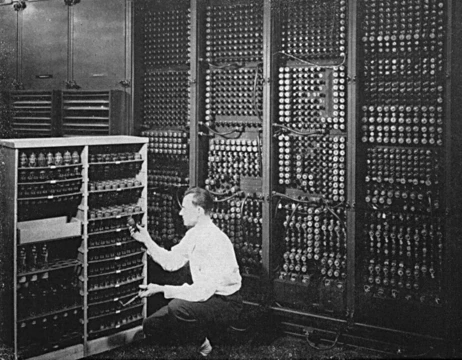
Computer file
A named collection of data managed as a unit.

A computer file is a named bundle of data that the system managing it treats as a single unit; that system is called a file system today. Older computers often lacked a separate file system, but some management feature was always needed to provide the file abstraction. Files can be passed between computers and mobile devices using removable media, networks, or the Internet. Different kinds of computer files serve different purposes: a file might hold a written message, a document, a spreadsheet, an image, a video, a program, or many other types of data. Some files can store several data types at once. Using computer programs, a person can open, read, change, save, and close a file. Files may be reopened, modified, and copied any number of times.
The word "file" comes from the Latin *filum*, meaning "a thread, string." In English, "file" later came to refer to various systems for arranging papers and documents for retrieval. "File" was used in computer storage as early as January 1940, when W. J. Eckert wrote about using punched cards to build tables "either as printed tables or as a file of punched cards." In February 1950, an RCA advertisement described a new memory vacuum tube that could keep results "on file" and retrieve them. By 1952, "file" denoted information stored on punched cards. In early computing, "file" could refer to the hardware itself, such as IBM 350 disk drives called "disk files." The modern meaning of "file" as a virtual entity managed by a "file system" began around 1961 with the Burroughs MCP and MIT's Compatible Time-Sharing System. The term "register file" shows an earlier concept, but its use has greatly declined.
A file system provides the file abstraction to software, letting it organize, name, and manipulate data as files. Early computers lacked a distinct file system, but the function was often provided directly by the core operating system. Modern systems may use multiple file systems: Unix-like systems typically allow several, and some Windows systems support both older FAT-type file systems and the normal NTFS.
A file manager is a utility that lets a user directly manipulate files—typically moving, creating, deleting, and renaming files and directories (also called folders), though it may not show file content. Most computer systems have at least one file manager for their native file system, such as File Explorer on Windows or Nautilus on several Linux distributions.
On most modern operating systems, files are organized as one-dimensional arrays of bytes. A file's format is defined by its content, since a file is just a container for data. On some platforms, the format is indicated by a filename extension, which specifies how the bytes must be organized and interpreted. For example, the bytes of a plain text file (.txt on Windows) are associated with ASCII or UTF-8 characters, while image, video, and audio files are interpreted differently. Most file types also set aside a few bytes for metadata, letting a file carry basic information about itself. Some file systems can store arbitrary file-specific data outside the file format but linked to the file, such as extended attributes or forks. On other file systems, this is done with sidecar files or software-specific databases. All these methods are more prone to losing metadata than container and archive file formats.
File size measures the storage space allocated to the file. It is often expressed in bytes, but many older file systems tracked size in larger units like blocks or tracks. Sometimes a more precise measure was available; for example, CP/M marked the end of a text file with Ctrl-Z, which could give a size with byte precision. Typically, a file system limits the maximum file size due to its design.
Information in a file can consist of smaller packets, often called records or lines, that differ individually but share common traits. For instance, a payroll file might contain details about every employee in a company, with each record concerning one employee and all records related to payroll—much like placing all payroll information into a specific filing cabinet in an office without a computer. A text file may contain lines of text, corresponding to printed lines on paper.
- etymology
- From Latin filum ('a thread, string')
- first use in computing
- January 1940
- early reference
- Punched Card Methods in Scientific Computation by W. J. Eckert
Lore & Background
A computer file is an abstract container for data, treated as a single unit by a file system. Early computers lacked a distinct file system, but the management feature providing this abstraction was always necessary. Files can be shared between computers via removable media, networks, or the internet. They are designed for many purposes, including storing text, documents, spreadsheets, images, videos, programs, or other data types; some files can hold multiple data types at once. Using a program, a user can open, read, change, save, and close a file, and files may be reopened, modified, or copied any number of times. On most modern systems, a file is organized as a one-dimensional array of bytes. Its format is defined by its content, though on some platforms the filename extension indicates how the bytes should be interpreted—for example, plain text bytes are associated with ASCII or UTF-8 characters, while image, video, or audio bytes follow different rules. Many file types allocate a few bytes for metadata. Some file systems can store arbitrary file-specific data outside the file format, such as extended attributes or forks, while others use sidecar files or databases, though these methods are more prone to metadata loss than container formats. File size measures allocated storage, often in bytes, though older systems used blocks or tracks; CP/M marked text file ends with Ctrl-Z for byte-precise size. File systems typically impose a maximum file size. Information within a file can be organized into smaller packets, like records or lines, that share common traits—similar to placing all payroll information into a specific filing cabinet.
Reader's Guide
The concept of a computer file is fundamental to modern computing, providing a way to organize, name, and manipulate data as a unit. Early computers lacked a distinct file system, but the function was required and often provided directly by the core operating system. Today, file systems enable software to organize data as files, and most modern operating systems include at least one file manager program for their native file system. Files are organized into one-dimensional arrays of bytes, with format often indicated by filename extension. The most basic operations on a file include creating, opening, reading, writing, deleting, and closing. In Unix-like systems, user-space programs interact with files through filenames, with the kernel handling low-level operations transparently.
Did You Know?
- The word 'file' derives from the Latin filum, meaning 'a thread, string.'
- The first extensive use of the early Hollerith Tabulator in astronomy was made by Comrie, using it to build a table from successive differences.
- In 1952, 'file' denoted, among other things, information stored on punched cards.
From Tally Sticks to Transistors: A Long Road to Computation
Long before silicon chips or binary code, human beings sought tools to ease the burden of counting. The earliest aids were likely simple tally sticks, followed by clay calculi sealed in hollow containers across the Fertile Crescent to track livestock or grain. The abacus, traceable to Babylonian devices as far back as 2400 BCE, became a staple of arithmetic for millennia. In the ancient Mediterranean world, the Antikythera mechanism—recovered from a shipwreck near Crete and dated to roughly 100 BCE—stands as the earliest known mechanical analog computer, designed to predict astronomical positions. No device of comparable complexity would reappear until the fourteenth century. The Industrial Revolution brought mechanical loom-guiding devices to automate tedious pattern work, and the early twentieth century saw specialized electrical analog calculators. True digital electronic computing emerged during World War II, evolving through rapid hardware generations: electromechanical relays and thermionic valves in the 1930s, semiconductor transistors in the 1940s, MOS transistors and monolithic integrated circuits in the 1950s. Each step shrank and accelerated the circuitry, culminating in the microprocessor and the microcomputer revolution of the 1970s. Moore's observation that transistor counts roughly doubled every two years set the pace for the sweeping Digital Revolution that reshaped the late twentieth and early twenty-first centuries.
The Word 'Computer' and the People Behind It
The word 'computer' carries a history far older than the machines it now describes. The Oxford English Dictionary traces the first known use to a 1613 book, The Yong Mans Gleanings, by English writer Richard Brathwait, who referred to 'the truest computer of Times'—a human being skilled in reckoning. For over three centuries the term meant exactly that: a person who performed calculations by hand. The Online Etymology Dictionary confirms this 'agent noun from compute' dating to the 1640s, with the shift to mean a 'calculating machine' not arriving until 1897. During the mid-twentieth century the meaning pivoted decisively. The theoretical sense of a programmable digital machine appears as early as 1937 in the concept of the Turing machine, and the modern usage—'programmable digital electronic computer'—is attested from 1945. What makes this transition particularly striking is the human labor behind those early calculations. Women were frequently hired as human computers because employers could pay them less than their male counterparts, and by 1943 the majority of people performing these calculations by hand were women. The name they carried for so long now belongs to the very machines that rendered their manual work obsolete.
Anatomy of a Modern Machine
A modern computer, in its conventional form, rests on a deceptively simple architectural foundation: at least one processing element—typically a central processing unit built around a microprocessor—paired with some form of computer memory, usually in the shape of semiconductor memory chips. The CPU is responsible for executing arithmetic and logical operations, while a sequencing and control unit within the system can alter the order in which those operations are performed, responding to information held in memory. This interplay between processing and stored instruction is what allows a single hardware platform to run an essentially unlimited variety of programs. Beyond the core, peripheral devices extend the machine's reach into the physical world. Input devices such as keyboards, mice, and joysticks feed data into the system; output devices like monitors and printers deliver results to the user; and hybrid input/output devices such as touchscreens combine both roles in a single interface. Together these peripherals let a computer retrieve information from external sources and save or recall the outcomes of its operations, closing the loop between digital computation and human interaction.
Everywhere and Nowhere: Computers in the Modern World
In the 1930s, electronic computers numbered only a handful. Today they are so pervasive that they serve as the hidden control systems inside an astonishing range of industrial and consumer products. The scale of variation is staggering: a single-purpose key fob, a microwave oven, or a television remote control sits at one end of the spectrum, while supercomputers and factory floors staffed by industrial robots occupy the other. Between those extremes lie the general-purpose personal computers and smartphones that anchor daily life for billions of people. Computers also power the Internet, the vast network that links billions of devices and users across the globe. The term 'computer system' can refer to a nominally complete unit—hardware, operating system, software, and the peripheral equipment required for full operation—or to a collection of linked machines working in concert, such as a computer network or a computer cluster. Whether embedded invisibly in a household appliance or driving the infrastructure of global commerce, the computer has become the quiet engine beneath virtually every facet of modern industrial and consumer life.
Frequently Asked Questions
What is a computer file?
A computer file is a named bundle of data that a file system treats as a single manageable unit. It can hold anything from plain text to images, videos, executable programs, or other structured data.
Where does the word 'file' in computing come from?
The term traces back to the Latin word 'filum,' meaning a thread or string. In computing it first appeared in print in January 1940 in W. J. Eckert's work 'Punched Card Methods in Scientific Computation.'
What kinds of data can a computer file contain?
Files are designed to store a wide range of content, including text documents, images, video, audio, and executable program code. Each file type is structured so the operating system and applications know how to read and process it.
How can a computer file be moved from one device to another?
Files can be transferred between computers and mobile devices through removable media like USB drives, over local networks, or across the Internet. This makes sharing and backing up data straightforward regardless of the platforms involved.
More in Computing & Digital 1-24
Spotted an error? Know more?
This is a living reference — every entry is fact-audited, and reader corrections feed straight into our audit queue. Suggest an edit · See this site's audit record